> ## Documentation Index
> Fetch the complete documentation index at: https://help.redii.co/llms.txt
> Use this file to discover all available pages before exploring further.
# Update your personal profile and contact email
> Edit personal details, check your contact email, and understand which information your employer manages.
As a member, open **Profile Settings** from **Member Hub**. The personal account page contains **Personal details**, **Work email**, and **Password**.
## Edit personal details
1. Select **Edit** beside **Personal details**.
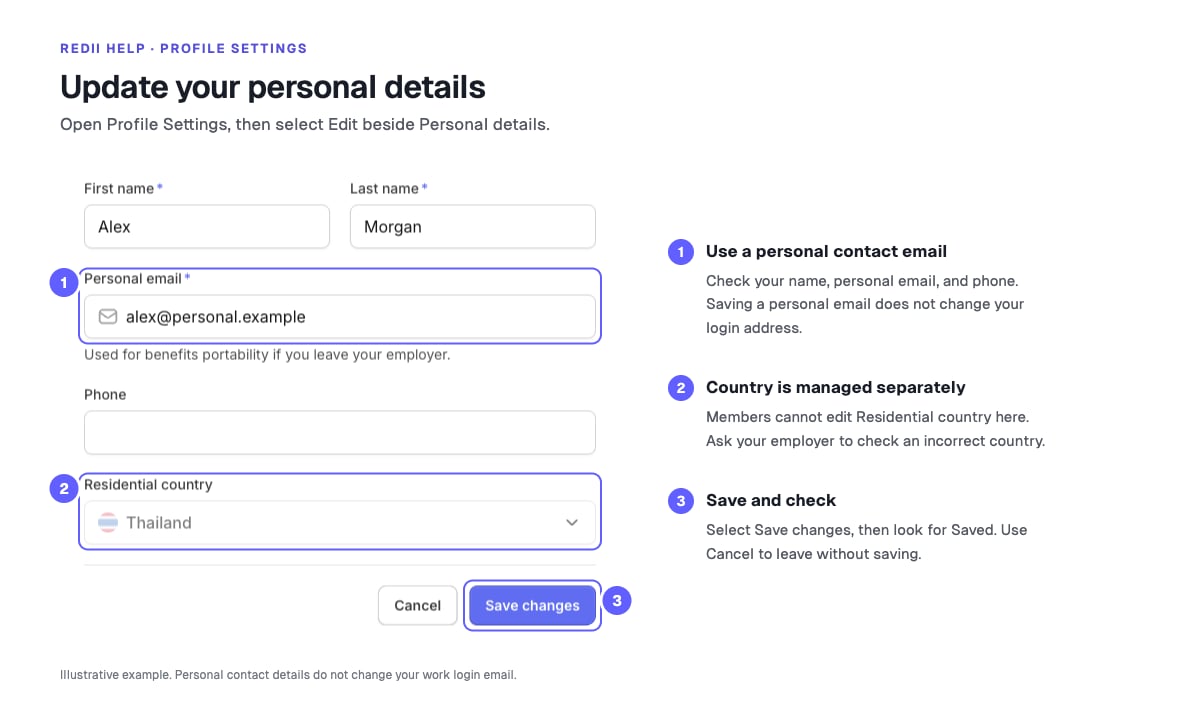
2. Check **First name**, **Last name**, **Personal email**, and **Phone**. Use a personal email you can still access if your employment changes.
3. Select **Save changes** and look for **Saved**. Select **Cancel** to leave the form without saving.
Members cannot edit **Residential country** from this form. Ask your employer to check an incorrect country or employment detail, such as department or job title. If a change does not save, read the error before trying again.
## Complete a personal-email prompt
Retirement Benefits may ask you to confirm or verify your personal email separately from saving the profile. Follow the prompt shown in your account:
* If it says **Confirm your personal email**, check the displayed address and select **Yes, that's correct** or **Confirm — this is my personal email**, whichever appears. Use **Use a different email** if the address is wrong.
* If it offers **Send verification link**, send the link, open the email at the displayed personal address, and follow it. Sign in to the same Redii account if prompted. **Personal email verified** confirms completion.
For a verification link that does not work, use **Send a new link** or return to the email prompt. Check the address first, use the newest message, and check your spam folder. Wait for any resend countdown shown before trying again. Updating your email can require a new confirmation or verification.
A personal email matching your work email may become unreachable when you leave. Update it if you have another address you intend to use for contact.
## Work email and password
**Work email** is your primary login email and is managed by your administrator. Saving a personal email does not change this login address. Ask your administrator about a work-email change or access after leaving.
To change your password while signed in, select **Change password** in **Password** and check the inbox for your login email. Follow [Reset your password](/account/reset-password) to finish. If you cannot sign in, start from that guide instead.
For an account or verification error you cannot resolve, [contact Redii support](/contact-support).